

Procedural galaxies#
Gaia Sky includes a flexible and powerful procedural galaxy system that enables real-time generation of galaxy models. The system is based on billboard particles, i.e., particles that are always oriented towards the camera.
The procedural galaxy system can be accessed in two main ways:
Interactive generation via UI: You can create and modify galaxies in real-time while Gaia Sky is running. By default, the generated galaxies are not persisted, but you can generate the corresponding JSON descriptor for the galaxy and copy it to the clipboard for further use.
Predefined generation via descriptor files: You can specify the galaxy parameters in JSON descriptor files. This allows textual definition and sharing of galaxy models. These files can be loaded at startup, making it easy to distribute galaxies for use by other Gaia Sky users.
In this section, we will first explain the generation pipeline. Then, we look at how to use the interactive procedural galaxy generation in Gaia Sky, and finally, we provide an overview of the underlying process and how to use it via descriptor files.
Channels and pipeline#
Every generated galaxy is composed of a few channels. Each channel represents a different component of the galaxy, such as stars, gas, dust, or H II regions. Each channel defines a set of parameters that are used to generate its particles. These parameters are things like the distribution (sphere, spiral, etc.), the particle size, the intensity, etc. Channels can also be either high- or low-resolution. High-resolution channels typically include stars and H II regions, while low-resolution ones (such as gas and dust) are rendered at lower resolution (approximately 4 times fewer pixels).
The procedural galaxy system relies on a hybrid CPU–GPU workflow:
Channel structure and parameters — the channel parameters (distribution type, transforms, colors, sizes, spirals, warps, etc.) are always generated on the CPU. This stage is lightweight, and in typical configurations only 3–6 channels are required.
Particle generation — particles for each channel are generated on the GPU using compute shaders when OpenGL 4.3 or newer is available. This allows millions of particles to be constructed efficiently in parallel.
If the system does not support OpenGL 4.3+, the renderer automatically falls back to CPU-based particle generation. The visual result is the same, but particle creation is slower.
This division ensures predictable CPU costs while exploiting the GPU for large-scale particle synthesis when possible.
Using procedural generation#
This subsection describes how to use the procedural generation via the provided UI.
Procedural generation window#
To open the procedural generation window, right-click on any procedural galaxy object to bring up the context menu and select Edit procedural galaxy…. You can also create a new galaxy using Create procedural galaxy… in the same menu. Alternatively, you can focus on the galaxy and click the  procedural galaxy generation icon in the camera info panel to bring up the generation window.
Interface overview#
The procedural galaxy generation window consists of the following sections:
Global Parameters: These settings apply to all channels of the galaxy and are displayed at the top of the window.
Channels: Below the global parameters, you’ll find a list of channels, organized into collapsible panes.
The window also includes buttons to add full-resolution and half-resolution channels, generate the galaxy based on the current settings, copy the galaxy’s JSON descriptor to the clipboard, and randomize the galaxy using the current morphology and a new seed.
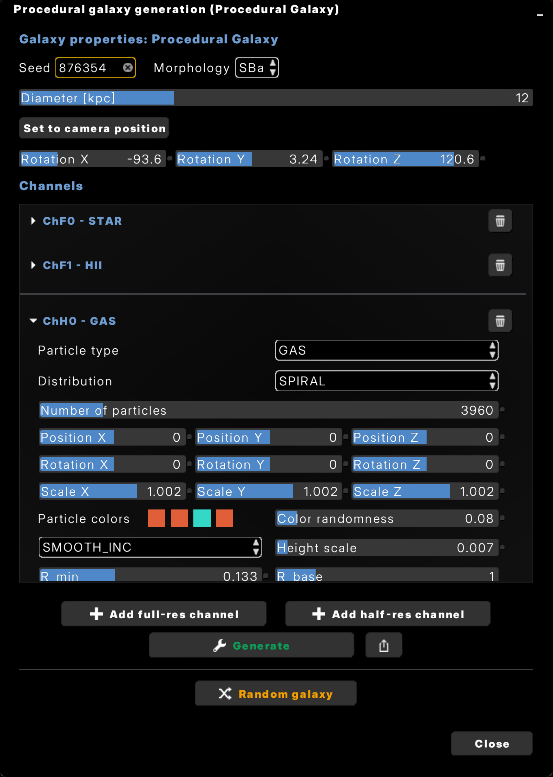
The procedural galaxy generation window displays the global properties at the top, the channels in the center, and the generation buttons at the bottom.#
Global parameters#
This section defines the attributes that affect the entire galaxy, independent of individual channels. These parameters sit at the top of the procedural galaxy window.
Seed#
The numerical seed used by the random generator. Changing the seed while keeping all other parameters fixed produces different galaxies of the same type.
Morphology#
The broad structural class of the galaxy. The morphology selector contains the entries in the Hubble sequence:
E0, E3, E5, E7: Elliptical galaxies, ranging from nearly spherical (E0) to highly elongated (E7).
S0: Lenticular galaxy with a dominant bulge and a disk but no obvious spiral structure.
Sa, Sb, Sc: Spiral galaxies, where Sa has tightly wound arms and a larger bulge, and Sc has loosely wound arms and a smaller bulge.
SBa, SBb, SBc: Barred spirals, analogous to Sa–Sc but featuring a bar.
Im: Irregular galaxies without clearly defined structure.
The morphology influences the default parameter ranges used by the randomizer and presets, and it guides high-level structure (elliptical vs. spiral vs. barred spiral vs. irregular).
Note that changing the morphology and then pressing Generate discards the current channel set and regenerates a whole new one from the new morphology. Changing any other control only re-runs particle generation for the existing channels.
Diameter#
The physical diameter of the galaxy, controlled with a slider. The value is expressed in kiloparsecs (kpc) and ranges from 0.2 to 40 kpc.
Set position to camera#
A convenience control that moves the galaxy so that its center coincides with the current camera position, or rather, a position right in front of the camera. This is useful when interactively constructing or inspecting a galaxy.
Rotation#
The galaxy’s global orientation. Rotation is defined by three sliders–X, Y, and Z–each specifying an angle in degrees, with a range of [-180°, 180°].
Channels#
Channels represent the various components of the galaxy, such as gas, stars, H II regions, dust, and bulges. These components are configured in a similar way, but the available controls can vary depending on the particle type and distribution selected for each channel. Below, we’ll cover all the controls and describe how they interact with different particle types and distributions.
Each channel name follows the format “A[#] - TYPE”, where:
A: Indicates the resolution type (H for half-resolution/low-res or F for full-resolution/high-res).
[#]: An index number within the respective resolution group.
TYPE: Specifies the type of particles in the channel (e.g., GAS, HII, STAR, DUST, BULGE, POINT).
To the right of the channel name is a trash can button that allows you to remove the channel.
Particle Type#
The type of particles in the channel. The available types are:
GAS
HII
STAR
DUST
BULGE
POINT
Distribution#
The distribution of particles in the channel defines how they are arranged in space. The controls available in this section depend on the distribution type selected.
SPHERE: Uniformly distributed in a spherical shape.
DISK: Uniformly distributed in a disk shape.
SPIRAL: Density wave distribution, producing natural spiral patterns.
Number of arms: Controls how many arms the spiral galaxy has (typically 2 or 4).
Base angle: Defines the spiral angle or how much of the galaxy the spiral covers (0–1000 degrees).
Arm sigma: The width of each spiral arm. Smaller values give thin, well-defined arms; larger values give a more diffuse, smooth spiral.
SPIRAL_LOG: Logarithmic spiral distribution, often used for more regular spirals.
Number of arms: Ranges from 1 to 8 arms.
Base angle: Similar to SPIRAL, defining the angle of the spiral in degrees.
BAR: Simple bar-shaped distribution.
ELLIPSOID: Particles are distributed in an ellipsoidal shape, with eccentricities defining the shape.
Flattening: Defines vertical and horizontal flattening.
DISK_GAUSS: Gaussian distribution in a disk with an overdense center.
SPHERE_GAUSS: Gaussian distribution in a spherical volume.
CONE: A conical distribution with particles arranged along a cone.
IRREGULAR: An irregular distribution with random placement of particles.
Aspect#
The X/Y aspect ratio of the channel, so that a galaxy can be generated wider than it is tall (or vice versa).
Number of Particles#
The total number of particles in this channel. This is a direct control over how many particles make up the component (e.g., stars, gas). The number of particles is determined by the selected particle type; the distribution has no effect on it.
Translation#
Controls for the translation (movement) of the particles along the X, Y, and Z axes. Each axis has a slider that allows you to translate the particles across space.
Rotation#
Controls for rotating the particles around the X, Y, and Z axes. Each axis has a slider that allows you to rotate the particles within the galaxy. Rotation is specified in degrees, with a range of [-180°, 180°].
Scale#
Controls for scaling the particles along the X, Y, and Z axes. These sliders adjust the size of the entire group of particles in the selected direction.
Particle Colors#
You can define the base colors of the particles using four color pickers. These colors determine the default appearance of the particles in the channel. The color pickers provide full RGB color selection for each of the four colors.
Color Randomness#
This parameter controls how much the particle colors will deviate from the base colors defined earlier. This allows for variation in the appearance of the particles, providing a more natural or complex look.
Warp Strength#
Controls the intensity of the galactic warp. This slider determines how strongly the disk bends upward or downward as a function of radius. The slider range depends on the channel’s particle type (typically -0.1 to 0.1); when warping is auto-generated, the value used is about 60% of that range.
Warping is generated automatically depending on the selected morphology, with the following probabilities:
Spiral (Sa, Sb, Sc): 60% chance of having a non-zero warp.
Barred spiral (SBa, SBb, SBc): 40% chance.
Lenticular (S0): 25% chance.
If the selected morphology falls into one of these categories, the system assigns a non-zero warp strength with the corresponding probability. Otherwise, the warp defaults to zero unless explicitly adjusted by the user.
Height Scale#
This controls the height scale for channels like disks, spirals, and other components with vertical structures. It defines how much the particles deviate vertically from the galactic plane, affecting the perceived “height” of the galaxy.
Height Profile#
The vertical profile of particles within the galaxy, defined as a function of the radius. This can be one of the following options:
Constant: Particles are uniformly distributed along the vertical axis.
Smooth increase: Particles increase in density as you move away from the center.
Smooth decrease: Particles decrease in density as you move outward.
Linear increase: Particles increase linearly with radius.
Linear decrease: Particles decrease linearly with radius.
Min Radius (R_min)#
This is the minimum radius, normalized, defining how close the particles can get to the center of the galaxy.
Base Radius (R_base)#
The base radius for the particles in the channel, also normalized. This is typically set to 1 by default.
Particle Size#
Controls the size of the individual particles in the channel. This setting affects the perceived resolution and density of the galaxy component.
FBM Noise#
This checkbox controls whether Fractal Brownian Motion (FBM) Perlin noise is applied to the galactic plane (XZ plane) to modulate the particle size generation. When enabled, the particle sizes will have noise-based variations across the galaxy.
Size Randomness#
If FBM Noise is disabled, this slider controls the amount of size noise applied to the particles (0–1). If FBM Noise is enabled, this slider instead controls the scale of the FBM noise itself (1–50): the spatial frequency of the noise, not its intensity.
Intensity#
This is a multiplier applied to the particle colors, controlling the overall intensity of the particles’ colors.
Number of Arms#
For spiral galaxies (SPIRAL and SPIRAL_LOG distributions), this parameter defines how many arms the galaxy has.
SPIRAL: Only 2 or 4 arms are supported.
SPIRAL_LOG: This can range from 1 to 8 arms.
Base Angle#
The base angle for spiral galaxies (both SPIRAL and SPIRAL_LOG), defining the angle or how much of the galaxy the spiral will cover. The value is expressed in degrees, ranging from 0 to 1000 degrees.
Eccentricity#
For SPIRAL distributions, this parameter controls the eccentricity of the spiral’s density wave. A higher eccentricity results in a more elongated spiral.
For the ELLIPSOID distribution, eccentricity splits into two parameters: vertical flattening and horizontal flattening, which control the ellipsoid’s overall shape.
Dx and Dy#
In SPIRAL mode, Dx and Dy represent the displacement of concentric ellipses. This results in an off-center galaxy center, creating more irregular, off-centered spiral structures.
Blending#
How the channel is composited with what is already in the scene:
Additive: particles add light to the background, so overlapping particles get brighter. Used for stars, gas and H II regions.
Subtrractive: particles darken what is behind them. Used for dust lanes, which appear as dark bands against the stellar disk.
Selecting the DUST particle type forces subtractive blending and disables depth writes for the channel automatically, so you do not need to change this yourself for dust.
Layers#
Which sprite layers the channel’s particles are drawn from. Channels that should occlude each other need different layers.
Max Size#
An upper bound on the rendered size of each particle, applied per graphics quality level. Particles larger than this are clamped, which bounds the cost of very close-up views of a dense channel.
Controls#
At the bottom of the procedural generation interface, several controls manage the galaxy configuration and channel setup:
 Add full-res channel — Create a new channel in the full-resolution group. These channels typically hold the primary visible structures (e.g., star disks, gas disks).
- Add half-res channel — Create a new channel in the half-resolution (low-resolution) group. These are intended for broader, less detailed components (e.g., bulges, halos, background structures).
- Generate — Build the galaxy using the current global parameters and all existing channels. This triggers particle generation (GPU-based when supported, otherwise CPU).
 Export configuration (JSON) — Export the entire galaxy setup—including global parameters, all channels, and their settings—as a JSON descriptor. The descriptor is copied to the clipboard; paste it into a file to save it.
 Randomize galaxy — Produces a new, random galaxy configuration while keeping the current morphology fixed.
This button:
Randomize galaxy — Produces a new, random galaxy configuration while keeping the current morphology fixed.
This button:Generates a new random seed.
Creates a new set of channels based on the fixed morphology.
Randomizes all relevant channel parameters.
Generates the particles for the new configuration.
This provides a fast way to explore variations within the same morphological class.
Descriptor Files#
Procedural galaxies can be fully defined through descriptor files. These files specify how a galaxy is constructed—either procedurally on demand or by loading particle data from external archives. Descriptor files are typically expressed in JSON and can contain global parameters, channel definitions, and other metadata.
For detailed information on all aspects of the format, see the section JSON data format.
Procedural Mode#
Procedural galaxy objects use the archetype BillboardGroup. The most relevant component for these galaxies is BillboardSet, which has the morphology, the procedural attribute, the seed, and the channels.
A billboard group is considered procedural when the field "procedural": true is present. In this mode, the system generates the galaxy at runtime using the parameters in the descriptor.
There are two procedural modes: explicit channels, and procedural channels. In both modes the particles are procedurally generated, but the source of the channels and their parameters differs.
Explicit channels — If the attribute ``”morphology”`` is not present, the system expects the user to provide the definition of each channel in an explicit manner in the
"data"attribute. In this case, the channels are not generated (they are read from the descriptor file), but the particles themselves are. See an example below.
Example with explicit channels
{
   "objects": [
     {
       "name": "Procedural Galaxy",
       "parent": "Universe",
       "labelColor": [ 1, 1, 1, 1 ],
       "sizePc": 20399.998981609755,
       "componentType": "Galaxies",
       "archetype": "BillboardGroup",
       "fadeObjectName": "Procedural Galaxy",
       "fadeOut": [ 7.3e8, 7.3e9 ],
       "procedural": true,
       "seed": 969566,
       "halfResolutionBuffer": false,
       "textures": [
         "$data/default-data/galaxy/sprites"
       ],
       "focusable": true,
       "renderLabel": true,
       "coordinates": {
         "impl": "gaiasky.util.coord.StaticCoordinates",
         "equatorial": [ 10.690000157921528, 41.2700006096746, 778000.0000000002 ]
       },
       "data": [
         {
           "impl": "gaiasky.scene.record.BillboardDataset",
           "type": "STAR",
           "distribution": "SPIRAL",
           "blending": "ADDITIVE",
           "depthMask": false,
           "particleCount": 25666,
           "size": 0.30000001192092896,
           "sizeNoise": 0.4000000059604645,
           "baseColors": [ 0.9599999785423279, 0.8399999737739563, 0.550000011920929 ],
           "maxSize": 0.15,
           "intensity": 2,
           "heightScale": 0.04845090210437775,
           "minRadius": 0.12018906325101852,
           "baseRadius": 1,
           "layers": [ 0, 1, 2, 4 ],
           "eccentricity": 0.23015737533569336,
           "aspect": 1,
           "baseAngle": 347.44879150390625,
           "numArms": 2,
           "armSigma": 0.187236949801445
         },
         {
           "impl": "gaiasky.scene.record.BillboardDataset",
           "type": "HII",
           "distribution": "SPIRAL",
           "blending": "ADDITIVE",
           "depthMask": false,
           "particleCount": 430,
           "size": 2.200000047683716,
           "sizeNoise": 0.6000000238418579,
           "baseColors": [ 0.8899999856948853, 0.3199999928474426, 0.4399999976158142 ],
           "maxSize": 0.4,
           "intensity": 1,
           "heightScale": 0.04845090210437775,
           "minRadius": 0.12018906325101852,
           "baseRadius": 1,
           "layers": [ 0, 3, 4, 5, 6, 7, 9, 10 ],
           "eccentricity": 0.23015737533569336,
           "aspect": 1,
           "baseAngle": 347.44879150390625,
           "numArms": 2,
           "armSigma": 0.187236949801445
         }
       ]
     },
     {
       "name": "Procedural Galaxy (HALF)",
       "sizePc": 20399.998981609755,
       "componentType": "Galaxies",
       "archetype": "BillboardGroup",
       "parent": "Procedural Galaxy",
       "fadeObjectName": "Procedural Galaxy",
       "fadeOut": [ 7.3e8, 7.3e9 ],
       "procedural": true,
       "seed": 55826,
       "halfResolutionBuffer": true,
       "textures": [
         "$data/default-data/galaxy/sprites"
       ],
       "focusable": false,
       "renderLabel": false,
       "coordinates": {
         "impl": "gaiasky.util.coord.StaticCoordinates",
         "equatorial": [ 10.690000157921528, 41.2700006096746, 778000.0000000002 ]
       },
       "data": [
         {
           "impl": "gaiasky.scene.record.BillboardDataset",
           "type": "GAS",
           "distribution": "SPIRAL",
           "blending": "ADDITIVE",
           "depthMask": false,
           "particleCount": 3390,
           "size": 51.78072814941406,
           "sizeNoise": 0.09000000357627869,
           "baseColors": [ 0.9998999834060669, 0.6665999889373779, 0.9998999834060669 ],
           "maxSize": 25.0,
           "intensity": 0.010750000344216824,
           "heightScale": 0.02,
           "minRadius": 0.19,
           "baseRadius": 1,
           "layers": [ 0, 1, 3 ],
           "eccentricity": 0.23015737533569336,
           "aspect": 1,
           "baseAngle": 704,
           "numArms": 2,
           "armSigma": 0.187236949801445
         },
         {
           "impl": "gaiasky.scene.record.BillboardDataset",
           "type": "DUST",
           "distribution": "SPIRAL",
           "blending": "SUBTRACTIVE",
           "depthMask": false,
           "particleCount": 28200,
           "size": 5.047,
           "sizeNoiseScale": 20.168298721313477,
           "baseColors": [ 0.75, 0.6000000238418579, 0.5 ],
           "maxSize": 25.0,
           "intensity": 0.05,
           "heightScale": 0.031,
           "heightProfile": "linear_inc",
           "minRadius": 0.19,
           "baseRadius": 1,
           "layers": [ 0, 1, 2, 3 ],
           "eccentricity": 0.23015737533569336,
           "aspect": 1,
           "baseAngle": 704,
           "numArms": 2,
           "armSigma": 0.187236949801445
         },
         {
           "impl": "gaiasky.scene.record.BillboardDataset",
           "type": "BULGE",
           "distribution": "SPHERE",
           "blending": "ADDITIVE",
           "depthMask": false,
           "particleCount": 5,
           "size": 97.5,
           "sizeNoise": 0.0,
           "baseColors": [ 1, 0.8991, 0.699 ],
           "maxSize": 35.0,
           "intensity": 0.5,
           "minRadius": 0,
           "baseRadius": 0.05,
           "layers": [ 0, 1, 2 ],
           "eccentricity": 0.30000001192092896,
           "aspect": 1,
           "baseAngle": 6,
           "numArms": 4,
           "armSigma": 0.4000000059604645
         }
       ]
     }
   ]
 }
Procedural channels — If both ``”morphology”`` and ``”seed”`` are provided, the system automatically creates an appropriate set of channels for that morphology. In this case, the
"data"array in the descriptor is ignored, since the channels and their parameter values are generated procedurally from the seed. The particles are then produced from the generated channels.
Example with procedural channels
{
   "objects": [
     {
       "name": "Procedural Galaxy",
       "color": [ 1.0, 1.0, 1.0, 1.0 ],
       "sizePc": 12000.0,
       "componentType": "Galaxies",
       "transformName": "galacticToEquatorial",
       "fadeObjectName": "Procedural Galaxy",
       "fadeOut": [ 240.0e3, 820.0e3 ],
       "parent": "Universe",
       "archetype": "BillboardGroup",
       "procedural": true,
       "morphology": "SBa",
       "seed": 876354,
       "focusable": true,
       "halfResolutionBuffer": false,
       "textures": [
         "$data/default-data/galaxy/sprites/"
       ],
       "coordinates": {
         "impl": "gaiasky.util.coord.StaticCoordinates",
         "transformName": "galToEq",
         "position": [ 0.0, 0.0, -946858341148427170.0 ]
       }
     },
     {
       "name": "Procedural Galaxy (HALF)",
       "sizePc": 12000.0,
       "cameraCollision": false,
       "componentType": "Galaxies",
       "transformName": "galacticToEquatorial",
       "fadeObjectName": "Procedural Galaxy",
       "fadeOut": [ 240.0e3, 820.0e3 ],
       "parent": "Procedural Galaxy",
       "archetype": "BillboardGroup",
       "procedural": true,
       "morphology": "SBa",
       "seed": 876354,
       "focusable": false,
       "renderLabel": false,
       "halfResolutionBuffer": true,
       "textures": [
         "$data/default-data/galaxy/sprites/"
       ],
       "coordinates": {
         "impl": "gaiasky.util.coord.StaticCoordinates",
         "transformName": "galToEq",
         "position": [ 0.0, 0.0, -946858341148427170.0 ]
       }
     }
   ]
 }
Non-procedural Mode (Explicit Data)#
If "procedural": false is specified, no procedural generation occurs. Instead, the descriptor must provide a "data" array, where each entry describes a channel whose particles are loaded from an external file.
Each such channel must contain:
"file"– the path to a gzipped particle data file containing the particles for that channel.
In this mode, no parameters such as distributions, colors, spirals, transforms, or counts are interpreted. The system simply loads the particles from disk and displays them as-is.
See the ‘Milky Way’ and ‘Milky Way (HALF)’ objects in the universe.json file of the base data pack for an example.
Mixed Parameters#
Descriptor files may include global parameters such as diameter, rotation, or translation, as well as channel-level properties. Not all fields need to be present; missing fields fall back to defaults. The loader is designed to be tolerant and forward-compatible.
Summary#
procedural: true→ galaxy generated at runtime, requiresdataarray (unlessmorphology+seedare provided).procedural: true+morphology+seed→ channels auto-generated;dataarray ignored.procedural: false→ no generation; each channel must specify afilepointing to a gzipped particle data file.
Descriptor files give you full control when needed, while still allowing efficient procedural generation when desired.